Finance OS
Finance OS is a Google Sheets™ add-on that brings bank transactions and account balances into a spreadsheet you own. Use that data in a Sheet you build or in a playbook for tasks like reviewing business expenses or planning a household budget.
Get the installation link by email, then open it on a computer to add Financial Assistant to Google Sheets™.
What is a Google Sheets™ add-on?
A Google Sheets™ add-on is a tool you install to give Sheets an extra capability. You open Financial Assistant from within Sheets, then use it to connect the accounts you want to track.
Where do I find add-ons?
Open a Google Sheet on a computer and go to Extensions → Add-ons → Get add-ons. That opens the Google Workspace Marketplace, where you can find add-ons and review the permissions they request during installation.
Google’s guide to installing add-onsHow does bank data get into your Sheet?
Connect the accounts you want to track
Open the add-on in your Sheet and use Plaid to connect your financial institution. Select the accounts you want to link, such as a checking account or credit card.
Find your balances and transactions
The Accounts tab shows balances for linked accounts. The Transactions tab shows activity, such as purchases, deposits, and refunds. Finance OS keeps both tabs up to date as new data comes in.
Use those tabs in your own workflow
Build your own views with Sheets formulas or use a playbook that organizes the data for you. The OS runs the capabilities included in the playbook, such as scheduled reports or alerts where offered.
How do you trace a spending total back to your bank transactions?
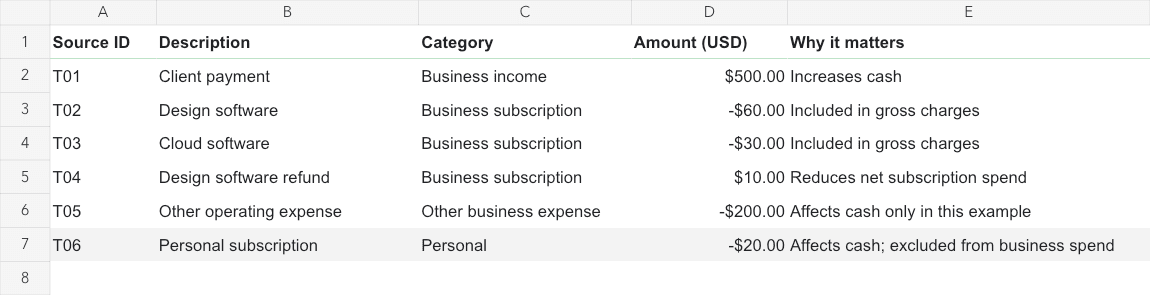
Say your business pays $60 for one software subscription and $30 for another, then gets a $10 refund. The Transactions tab shows all three entries. A playbook can group them in Expenses so you see $80 in net software spending and can trace that total back to the charges and refund.
Frequently asked questions
What do I need to set up Finance OS?
Start with a Google account, a Sheet you own, and a financial account you can link through Plaid. Use Google Sheets™ on a computer to install the add-on and review the permissions Google shows you.
Can I link more than one account at the same bank?
When Plaid lists eligible accounts at your institution, select each one you want to track. A checking account and a credit card count as two linked accounts even if they’re at the same institution.
How much does Finance OS cost?
Finance OS costs $1 per linked account per month. Linking a checking account and a credit card costs $2 per month.
Do I need a playbook to use Finance OS?
You can start with Accounts and Transactions and build your own views in Sheets. A playbook gives you a ready-made template, built-in capabilities, and AI instructions for a specific task.
Do I need AI to sync my accounts?
Finance OS handles the sync. Connect your Sheet to your AI provider separately when you want help reviewing the numbers.
Who can see my financial data in Google Sheets™?
Your financial data appears in the Sheet you own. Use Google Sheets™ sharing settings to control who can view or edit the file. Review the access requested by any AI provider you connect.
What if my bank or account isn’t listed?
Check that you selected the right institution in Plaid. If the account is unavailable there, you can link another eligible account or contact Financial Assistant Support for help with your setup.