Business Finances
Know where your business stands
See whether you’re making money and where your cash goes. Manage your business finances in Google Sheets™ and work through decisions with your AI.
Get StartedFinance OS
How it works
Manage your business finances in Sheets. Use the playbook with the AI you already use.
Install the add-on
Add Financial Assistant to Google Sheets™ from Google Workspace Marketplace. Finance OS runs inside your Sheet.
Connect your accounts
Use Finance OS to bring business transactions and account balances into a Google Sheet you own.
Add a playbook
Get the Business Finance Playbook: a prebuilt template, financial tools, and a process to work through with your AI, with Finance OS included.
Work with your AI
Connect your Sheet to your own AI. Review your numbers, explore scenarios, and save the changes you approve.
Business Finances
Your financial workspace for AI collaboration
The Business Finance Playbook includes a Google Sheets™ template, financial tools, and prebuilt processes you work through with your own AI.
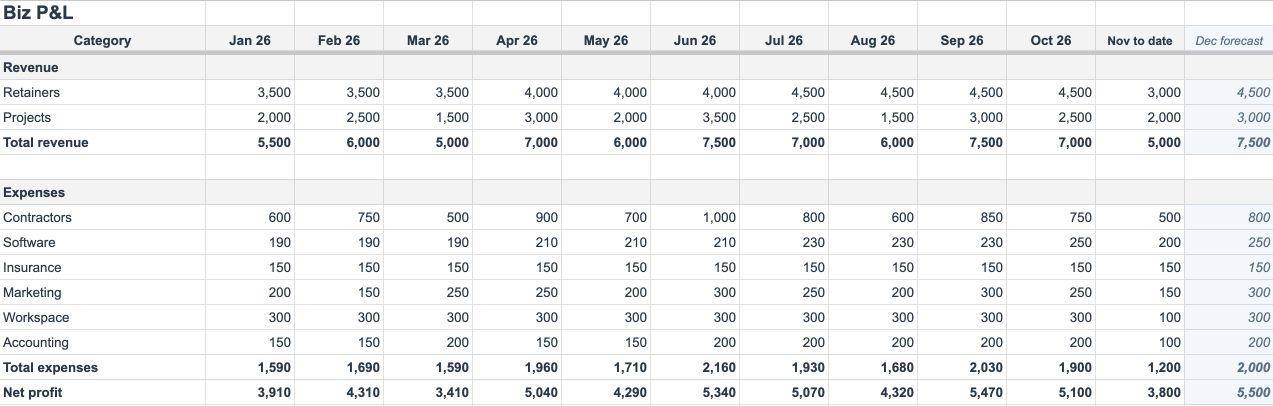
See what you earn, spend, and keep.
Compare revenue, expenses, and net profit across the year. Keep actuals and forecasts together, with a clear visual distinction.
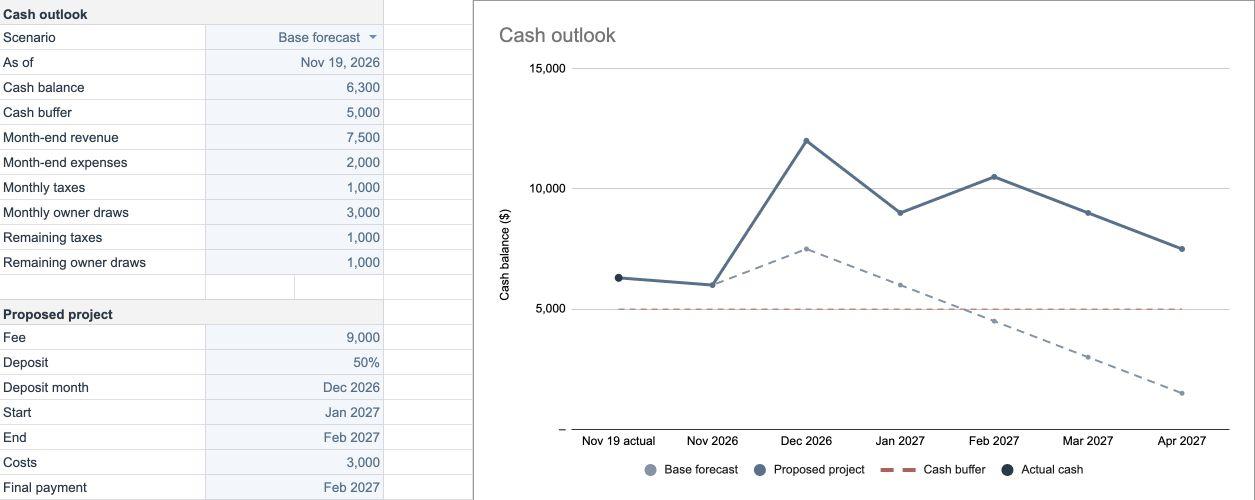
See the cash impact before you commit.
Adjust project income, costs, and payment timing. Compare scenarios to spot a potential shortfall before it happens.
A process you don’t have to invent.
Your AI uses the playbook’s instructions to read your Sheet, work through the forecast with you, and save changes you approve.
- 01
Review your numbers
Read revenue, expenses, and cash assumptions from the template.
- 02
Explore a decision
Work through a new project, its costs, and when payments will arrive.
- 03
Compare the outlook
See how the proposed plan changes your forecast and cash buffer.
- 04
Approve the update
Choose what to change, then have your AI save the agreed plan to your Sheet.
Business Finance Playbook
Your template, financial tools, and AI workflows in one playbook. Start with your numbers and work toward a plan for your business.
Explore the playbook details$49 /year
Includes 12 months of Finance OS.