Business Finances Template for Google Sheets™
The Business Finance Playbook includes a Google Sheets™ template with four connected worksheets. Use Expenses, Profit & Loss, Balance Sheet, and Cash Flow to see what you spend, whether you make a profit, what you own and owe, and how cash moves. Expenses feeds Profit & Loss, profit flows into owner equity, and closing cash ties Cash Flow to the Balance Sheet.
Expenses
 Open full-size Expenses image
Where is my business spending money?
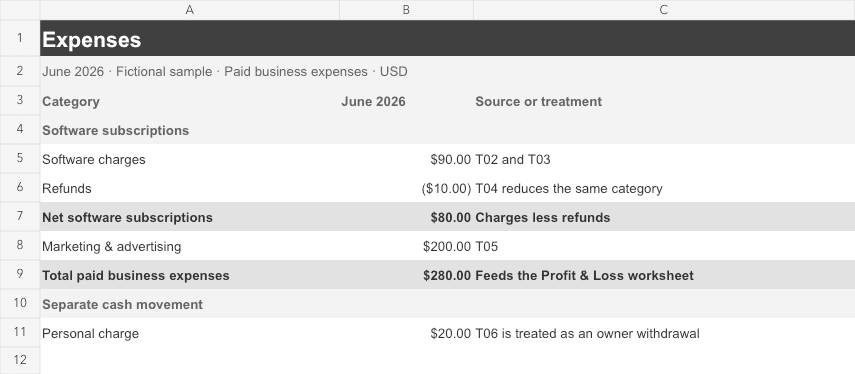
The Expenses worksheet groups payments by category so you can see which costs are worth reviewing. It helps you spot recurring charges and see how refunds change what you actually spent.
How to set it up
- Start with one row per transaction. Record the date, vendor, description, category, signed amount, and a reference to the source transaction or receipt.
- Use the same category for a charge and its refund. Keep personal transactions and owner withdrawals separate from business expenses.
- Summarize one month at a time. Open the underlying rows for any total you want to explain.
How to read the numbers
$60 for design software plus $30 for cloud software, less a $10 refund, leaves $80 in net subscriptions. Add $200 for marketing and paid business expenses total $280. The $20 personal charge is an owner withdrawal in this example. It reduces cash and equity.
See the subscription transactionsTry asking AI
“Which transactions make up the $80 in software subscriptions? List the source rows, show how you treated refunds, and flag any personal charges separately.”
Expenses questions
- What columns should a business expense tracker have?
- Start with date, vendor, description, category, amount, and a transaction or receipt reference. A business or personal label helps you review ambiguous charges.
- How do I show a refund?
- Put the refund in the original category and give it the opposite sign from the charge. The category total then shows net spending.
- How should I handle a personal payment from the business account?
- Identify the payment separately so you can reconcile the bank balance and keep your business expense total accurate. This example treats it as an owner withdrawal.
Profit & Loss
 Open full-size Profit & Loss image
Did my business make money this month?
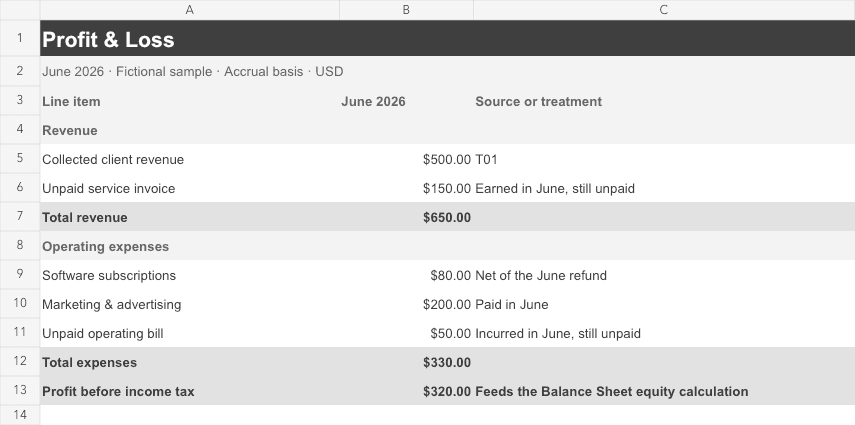
Profit & Loss compares revenue with the costs of earning it over a period. Use it to see whether your pricing and spending leave enough profit and to decide which costs to investigate first.
How to set it up
- Choose a reporting period and an accounting basis. In this accrual example, revenue is recorded when earned and expenses when incurred.
- Group revenue and costs. Pull paid business costs from Expenses, then add unpaid bills and earned invoices where the accounting basis calls for them. Check that you count each item once.
- Subtract expenses from revenue. Compare the result with prior periods and trace the largest changes to specific invoices or cost categories.
How to read the numbers
June revenue is $650, including a $150 invoice still unpaid. Expenses are $330, including a $50 unpaid bill. The resulting $320 profit before income tax flows into owner equity on the Balance Sheet.
Try asking AI
“Explain the $320 profit. Separate collected and unpaid revenue, show the costs by category, and point to the rows that support each amount.”
Profit & Loss questions
- What goes on a monthly P&L?
- Include revenue and the costs attributable to the month. Depending on the business, that can include direct costs, operating expenses, interest, and tax. The sample shows profit before income tax.
- Where do unpaid invoices and bills go?
- On an accrual basis, include earned invoices in revenue and incurred bills in expenses for the period. Their unpaid balances also appear as receivables and payables on the Balance Sheet.
- Why is profit different from the change in cash?
- Profit follows the accounting basis. Cash follows payments and receipts. In June, an unpaid invoice, an unpaid bill, and an owner withdrawal explain the difference.
Balance Sheet
 Open full-size Balance Sheet image
What does my business own and owe today?
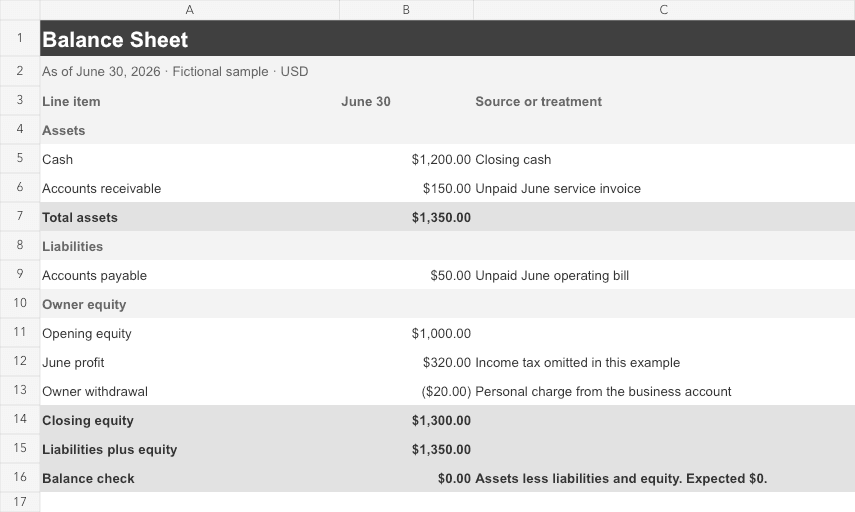
A Balance Sheet shows assets, liabilities, and owner equity on one date. It helps you see how much is in the bank, what you are waiting to collect, and what you will need to pay.
How to set it up
- Choose an as-of date. Enter cash, receivables, and other relevant assets using balances as of that date.
- Enter unpaid bills, debt, and other obligations outstanding as of that date, even if payment is due later. Reconcile receivables and payables against the open invoices and bills.
- Roll forward equity using opening equity, profit, owner contributions, and withdrawals. Check that assets equal liabilities plus equity.
How to read the numbers
On June 30, $1,200 in cash plus a $150 receivable gives $1,350 in assets. The business owes $50, leaving $1,300 in equity. Equity also reconciles as $1,000 opening equity plus $320 profit less the $20 withdrawal.
Try asking AI
“Check whether this Balance Sheet balances. Trace cash to Cash Flow and equity to the opening balance, Profit & Loss, and the owner withdrawal. List any rows I need to review.”
Balance Sheet questions
- What belongs on a small business Balance Sheet?
- Include the assets the business controls, the liabilities it owes, and owner equity as of one date. Cash, unpaid customer invoices, and unpaid supplier bills are common starting points.
- How do I distinguish an asset from a liability?
- An asset is something the business owns or has a right to receive. A liability is something the business owes, such as an unpaid supplier bill.
- What should I check if it does not balance?
- Compare assets with liabilities plus equity. Check opening balances, the dates on account totals, missing liabilities, and whether the period’s profit and withdrawals reached equity.
Cash Flow
 Open full-size Cash Flow image
Where did the cash go?
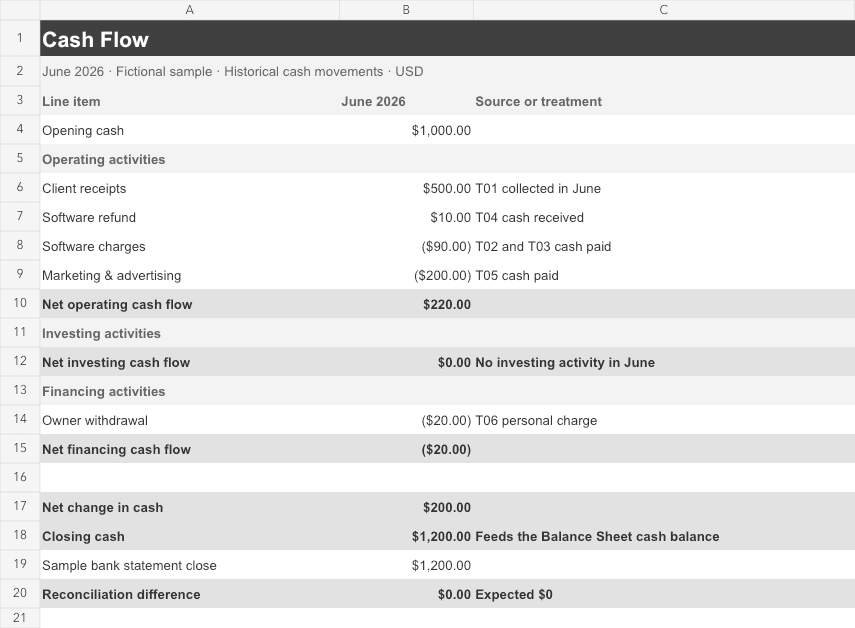
The Cash Flow worksheet explains the movement between opening and closing cash. It helps you separate cash generated by day-to-day operations from movements such as equipment purchases, borrowing, and owner withdrawals.
How to set it up
- Start with the opening cash balance for the period. Bring in cash receipts and payments from the same period.
- Group movements into operating, investing, and financing activity where applicable. Separate unpaid invoices and bills until cash actually moves.
- Add net cash movement to opening cash. Compare closing cash with the bank statement and the cash line on the Balance Sheet.
How to read the numbers
Operations brought in $220 after payments and the refund. A $20 owner withdrawal reduced the net increase to $200. Add that to $1,000 opening cash and you get $1,200 closing cash, which agrees with the bank statement and Balance Sheet.
Try asking AI
“Bridge the $320 profit to the $200 increase in cash. Show what the unpaid invoice, unpaid bill, and owner withdrawal each contribute, then verify the closing cash against the Balance Sheet.”
Cash Flow questions
- How do I calculate closing cash?
- Add all net cash movements for the period to opening cash. Compare the result with the closing balance for the same accounts and dates.
- How can I make a profit and still have less cash?
- Customers may pay after you record revenue. Purchases of equipment, debt repayments, and owner withdrawals can also use cash during a profitable period.
- What is the difference between a Cash Flow worksheet and a forecast?
- A historical cash flow worksheet explains movements that happened. A forecast estimates future receipts and payments using assumptions such as invoice payment dates.
Business Finance Playbook
$49/year
Review expenses, profit, cash flow, and what your business owns and owes in one Google Sheet. Built-in capabilities and AI instructions help you trace the numbers back to their source.
Includes 12 months of Finance OS.
Further reading: SEC guide to financial statements and SBA financial management guidance.