How to Run a Weekly Money Check-In with AI and Google Sheets™
Use your existing financial plan to catch cash timing problems, explain spending changes, and choose one useful action in a weekly AI money review.
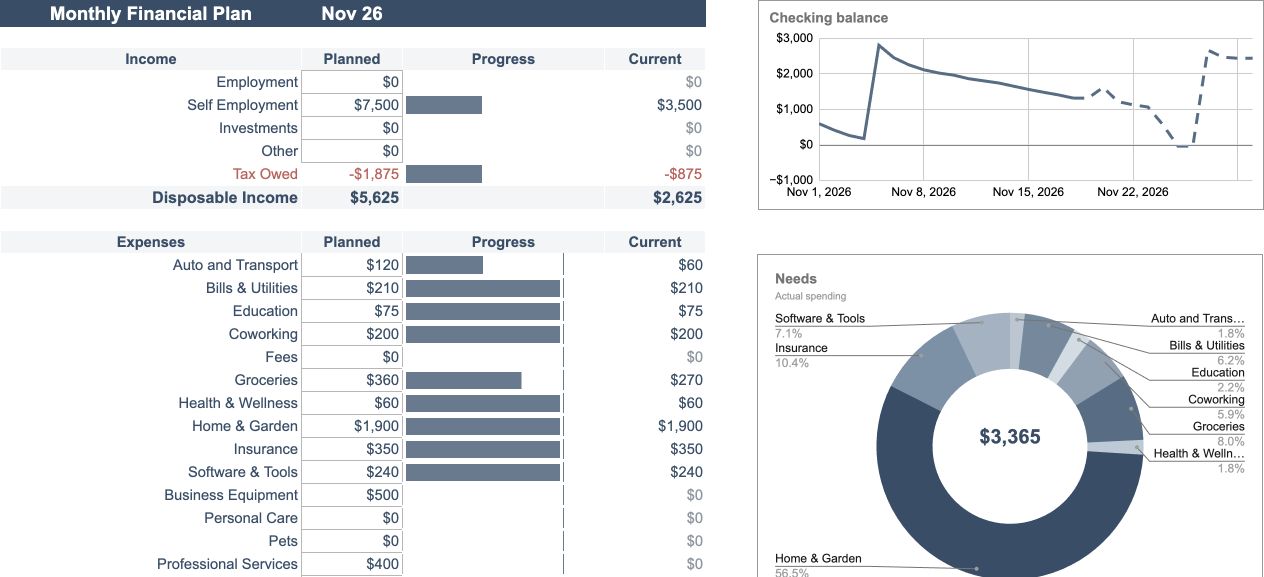
A weekly money check-in is a short review of what changed, what is due before the next income arrives, and what needs a decision. Use your AI to explain the records behind a change and choose one useful action, then keep the result in your Google Sheets™ workspace.
This review builds on your financial picture and approved financial plan. You do not need to restart the intake or rebuild the budget each week. Ask about facts that are new, missing, or uncertain.
These prompts assume your AI can read your Financial Plan from Financial Assistant and its underlying income, expense, and account records. Use relevant preferences already available to your AI. If information or an earlier decision is missing, unclear, or out of date, ask before relying on it. Review the calculations and approve proposed updates before they are saved to your Sheet.
1. What needs cash before the next payday?
Read dated cleared balances and list scheduled payments, expected income, and essential spending before the next confirmed deposit. Keep money already reserved for tax, annual bills, or a goal attached to its purpose.
A fictional check starts with $800. A $650 bill due before the next $1,200 deposit leaves $150. Groceries of $180 would create a $30 gap before payday even though the deposit makes the month’s total look healthy.
| Event | Running cash |
|---|---|
| Start | $800 |
| Bill clears: $650 | $150 |
| Groceries before payday: $180 | −$30 |
| Next deposit: $1,200 | $1,170 |
AI prompt to catch a cash problem hidden by the monthly budget
“Use my Financial Plan from Financial Assistant and the cash allocations we approved. Check cleared balances, bills, and essential spending through the next confirmed payday. Ask for missing dates and keep expected income separate from received cash. Show the lowest balance and any gap before a deposit arrives, preserving earmarked funds. Propose the one timing or spending decision that needs my approval first.”
For the dated forecast and delay tests, use the cash-flow guide. A monthly surplus cannot pay a bill with money that has not arrived.
2. Which spending change deserves a closer look?
Compare similar periods and inspect the transactions behind the largest useful change. Separate an annual bill, a duplicate, a refund, and a real recurring increase. A category label alone cannot tell whether spending mattered to you.
If dining rises $45, ask whether it was a valued meal, timing, or a habit you want to change. Cancelling an unrelated expense without understanding the increase does not explain what happened.
AI prompt to find a spending change worth acting on
“Use my Financial Plan from Financial Assistant and the expense history behind it. Compare the last complete week with a relevant baseline and show the transactions driving the meaningful changes. Separate one-off events, refunds, transfers, and recurring increases. Use what I have shared about spending I value and ask when its purpose is unclear. Suggest one reviewable change with its dollar effect, then propose any classification correction for approval.”
3. Is a goal behind, or is the payment simply not recorded yet?
Compare actual contributions with the approved goal schedule and check whether transfers have cleared. A delayed transfer needs a different response from several weeks of underfunding. Keep one-time income separate from an improvement you can repeat.
In a separate fictional goal check, the plan needs $100 each week and only $300 has been recorded after four weeks. If the missing $100 is still in checking and scheduled, confirm timing. If it was spent, the goal has a real funding gap.
AI prompt to explain a goal shortfall before changing the whole plan
“Use my Financial Plan from Financial Assistant and the goals I approved. Compare actual contributions and dated balances with the schedule. Check whether a missing amount is pending, misclassified, or no longer available. Ask about the cause rather than assuming I should cut spending. Show the effect of a timing correction versus a recurring gap, and propose the smallest sustainable adjustment for approval.”
4. What is the one useful action to take this week?
Choose the action that resolves the most immediate useful question: verify a bill, move a due date with the provider, review a renewal, or revise a contribution. Record the amount, owner, and next check. A proposed transfer or cancellation remains your action to approve and complete.
Use the Financial Planning review when a recurring shortfall affects goals. Use the Debt Payoff review when interest, purchases, or payments change a payoff date.
AI prompt to finish the review with a clear decision
“Use my Financial Plan from Financial Assistant and the cash, spending, and goal findings from this check-in. Rank unresolved items by the cash or goal consequence this week. Recommend one action that fits what I have told you I can maintain, showing the amount and reason. Ask which option I choose and propose the relevant Sheet update and next check for approval. Do not treat the proposed action as completed until I confirm it.”
Common questions
How often should I review my finances?
A weekly check helps with cash timing and recent changes. A monthly review reconciles income, spending, balances, and goal progress. Review sooner after a major change or when cash is tight.
Do I need to categorize every transaction during a weekly check-in?
Prioritize missing or incorrect records that change this week’s decision. Reconcile the full period during the regular management review so unresolved items do not accumulate.
Does AI run this check automatically?
This guide describes a review you start with your AI using the records it can access. It does not assume automatic monitoring, reminders, transfers, or cancellations.
How the process works with your AI
The Personal Finance Playbook combines Financial Management and Financial Planning with the matching Google Sheets™ template. These review prompts are part of that larger process: update the picture, understand the change, and choose what happens next.
Use the Financial Management worksheet guide to check the underlying records, and return to Financial Planning when the review changes a goal.
Supporting guidance: CFPB cash-flow budget worksheet.
Get the Personal Finance Playbook
Get the matching Google Sheets™ template and guided prompts to work through with your AI. Enter your name and Gmail address and we’ll send you the Personal Finance Playbook.