How to Use AI with Your Finances in Google Sheets™
Get more useful financial answers from your AI: build on your existing picture, ask a deeper question, compare the effect, and approve changes in Google Sheets.
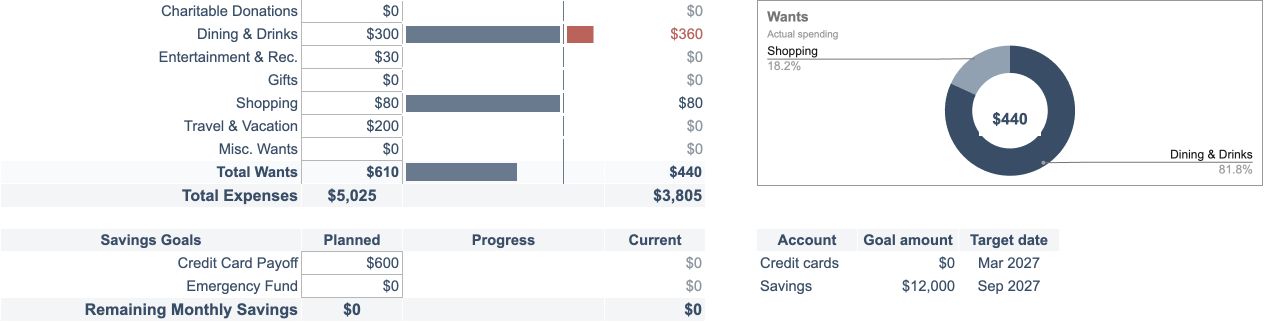
Using AI with your finances is most useful when a question leads to a decision you can check. Give your AI access to the relevant financial picture, carry forward what you have already decided, ask what could change the answer, and compare the effect before updating your Sheet.
Financial Assistant connects the workspace and playbook process with the AI you use. The point is a guided series of questions, comparisons, and approved updates, rather than restarting with a generic “make me a budget” request.
These prompts assume your AI can read your Financial Plan from Financial Assistant and its underlying income, expense, and account records. Use relevant preferences already available to your AI. If information or an earlier decision is missing, unclear, or out of date, ask before relying on it. Review the calculations and approve proposed updates before they are saved to your Sheet.
1. What does your AI need to know before giving a useful answer?
Use your Financial Plan and the underlying Income, Expenses, and Accounts as the source of amounts and dates. Preferences can come from relevant context already available to your AI; confirm them when they are missing, old, or unclear.
A transaction can show a subscription charge, but cannot prove you do not enjoy the service. A cash balance can show money held, but cannot prove it is available for a new goal. Ask the missing question that could change the recommendation.
AI prompt to find what is missing before recommending a change
“Use my Financial Plan from Financial Assistant and the question I want to resolve. Identify the records, dates, prior decisions, and relevant preferences already available. Ask for the missing or uncertain detail most likely to change the answer, rather than restarting the full intake. Separate verified facts, assumptions, and personal choices. Propose any record corrections for approval before comparing actions.”
2. What would you not think to ask on your own?
Move from a category total to the decision underneath it. Ask which recurring costs no longer serve your priorities, which cash is already spoken for, or whether a home’s upkeep changes its affordability. The better question uses your circumstances and exposes a hidden trade-off.
In a fictional expense review, an unused $18 service, a $12 duplicate, and a $30 downgrade together free $60 a month. Keep a service you value even if it looks expensive next to others. Confirm use and switching costs before counting savings.
AI prompt to find a saving that does not make your life worse
“Use my Financial Plan from Financial Assistant and my expense transactions. Find recurring charges, duplicate services, and price changes that may not support what I have told you I value. Ask about actual use before judging value. Compare keeping, downgrading, switching, and cancelling, showing realistic savings and any fees or lost features. Protect spending I value and propose changes for my approval.”
The Financial Management guide takes that question through the wider picture. For a home listing, use the upkeep prompt instead of stopping at the mortgage payment.
3. Does the answer change the decision by a meaningful amount?
Require the baseline, proposed alternative, assumptions, units, and effect on a chosen goal. A higher interest rate does not necessarily save a whole month; a bigger spending cut may not change the final payoff month.
For a fictional $3,600 goal with $300 contributed each month and no interest, twelve contributions reach the target. Redirecting the verified $60 saving makes the contribution $360 and reaches it in ten. This assumes the saving continues, starts immediately, and is assigned to this goal alone.
| Monthly contribution | Contributions needed |
|---|---|
| $300 | 12 |
| $360 after the $60 saving | 10 |
AI prompt to show whether a better-looking number matters to your goal
“Use my Financial Plan from Financial Assistant, the verified saving we found, and the goal I chose. Compare the baseline with the alternative using consistent timing, fees, and assumptions. Show contribution, completion date, and total cost or interest where relevant. Do not claim a whole-month improvement unless the calculation supports it. Ask which trade-off I prefer and propose a separate scenario for approval.”
4. What should your AI update, and what should you check first?
Ask for the specific proposed field, current value, new value, and reason. Keep recorded results, forecasts, and proposed scenarios distinct. Confirm that totals reconcile and that a recommendation uses the same income, spending, and account dates.
Review access in the AI application and the connected Sheet. A proposed cancellation, transfer, or provider change is not complete just because it is written in a plan. This process does not assume your AI executes those actions.
AI prompt to make a recommendation reviewable before it changes your Sheet
“Use my Financial Plan from Financial Assistant and the scenario I chose. List each proposed Sheet change with its current value, new value, calculation, and source. Preserve actual records and show uncertain inputs separately. Check transfers, refunds, taxes, and cash allocations for double counting. Ask for my approval before saving and distinguish proposed external actions from actions I have confirmed complete.”
5. How do you keep the conversation moving toward the goal?
Use the accepted answer as the starting point for the next question. If the goal is funded, choose what comes next. If it is behind, determine whether timing, missing records, or a recurring shortfall caused the gap.
Use the Financial Planning review for goals and the weekly check-in for near-term cash. Let current preferences override older context when the direction changes.
AI prompt to find the next question that moves your plan forward
“Use my Financial Plan from Financial Assistant and the decisions I approved. Compare current records with the goal and identify the next unresolved question that could change what I do. Ask about changed preferences or missing context. Show the effect of a small realistic adjustment, or explore the next goal if this one is complete. Propose the next decision and any Sheet update for approval.”
Common questions
Do I need one enormous prompt to manage my money?
No. A connected sequence lets each answer inform the next question. Start with the financial picture, resolve one decision, compare its effect, approve the update, and continue.
Will my AI already know my preferences?
It may have relevant context from prior conversations, but that depends on what is available in the current application and session. Ask it to confirm missing, unclear, or changed preferences instead of assuming memory.
Can I do this without connecting my Sheet?
You can work from the relevant records you provide, but the connected-workspace prompts require your AI to read those records through the connection you have configured. Do not treat access as established until the relevant information is available.
How the process works with your AI
The financial playbooks combine templates with a process to work through with your AI. Finance OS supplies linked financial records; the playbook guides the decisions, and you choose which changes to keep.
Start with the Personal Finance Playbook for household management and planning, or use the freelance finances guide and Business Finance Playbook for business decisions.
Supporting guidance: How Finance OS works.
Get the Personal Finance Playbook
Get the matching Google Sheets™ template and guided prompts to work through with your AI. Enter your name and Gmail address and we’ll send you the Personal Finance Playbook.